


Your Path to a CtF
Overview
This document provides a high-level overview of the CtF onboarding and renewal process. It is intended for product teams and technical leads beginning their CtF journey or preparing for a renewal. This document explains what CtF is, what is required, who is involved, and when key activities occur. Use this guide to understand prerequisites, required documentation, onboarding expectations, key meetings, and the overall process flow before starting a CtF request.
For detailed validation procedures and tool-specific guidance, refer to the CtF Process documentation.
CtF Process Visual
The CtF is the application-level authorization to operate in a specific environment. It is required for all P1 production applications at their designated IL/classification and for any application using production data in any environment. CtFs are issued by P1 and are valid for one year, unless significant version or architectural changes require reassessment.
Below is a graphic that provides a high-level view of the onboarding process for a CtF.
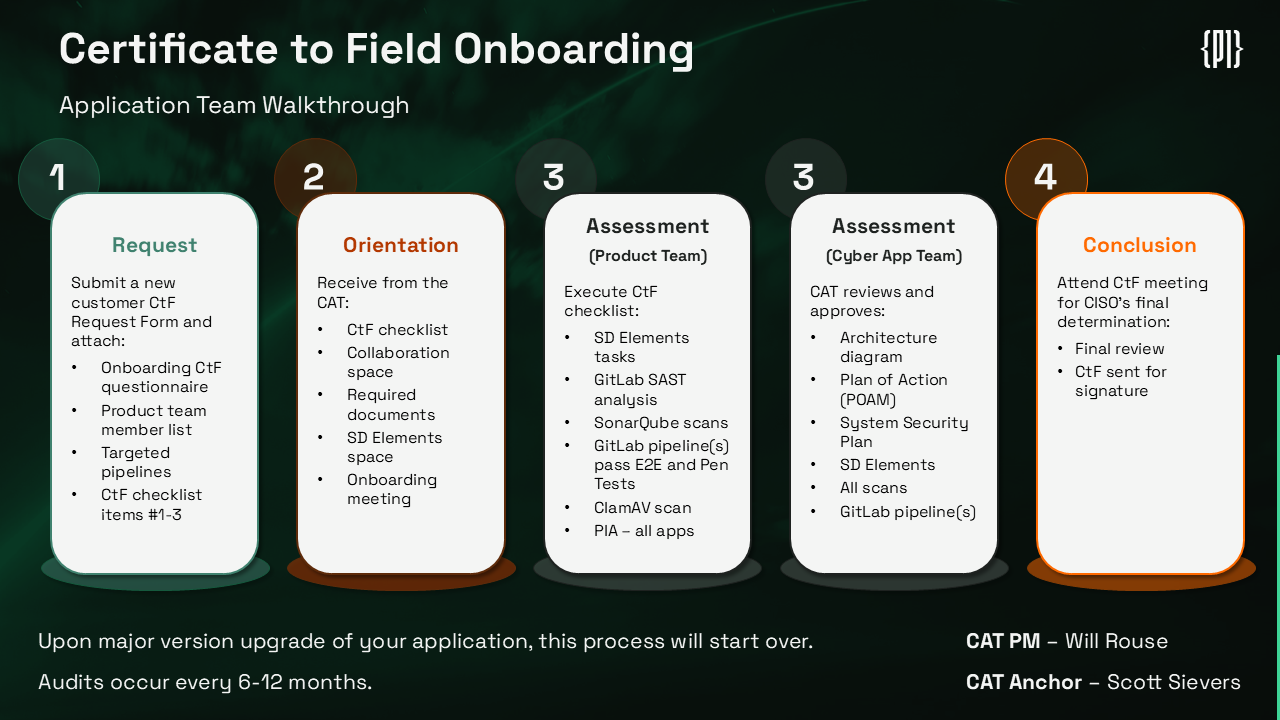 Note: POCs may differ from the image
Key Roles and Responsibilities
| Role / Team | Responsibility |
|---|---|
| Product Team | Prepares documentation, maintains pipelines, completes SDE tasks, remediates findings, and submits CtF request. |
| CAT | Manages onboarding, reviews materials, validates security posture, and supports CtF issuance. |
| P1 CISO/AO | Approves and issues the CtF. |
| MDO | Maintains platform controls, validates exceptions, updates pipelines, and provides technical support. |
| Cybersecurity Testers/ Assessors | Validates controls, reviews evidence, and identifies findings. |
| Privacy Office/ Local Command | Reviews and signs PIAs when PII is present. |
Initial Requirements
The product team must complete the following and upload them to their document repository before the initial onboarding meeting.
IMPORTANT
CAT members require reporter-level access to your GitLab pipelines included in the CtF request.
Product Team Member List: View Document | Download
System architecture diagram
List of targeted pipelines and descriptions
- Include a basic text document with a list of targeted pipeline URLs and a brief description of each pipeline with the function it performs. This information is required to issue your CtF letter.
Signed Privacy Impact Assessment (DD Form 2930)
Store/Process PII?
DoD 5400.11‑R (DL1.14) defines PII as information that identifies or describes an individual, such as SSN, age, rank, contact info, and other personal or demographic details.
- No - Your DD Form 2930 may be signed by your local command.
- Yes - Your DD Form 2930 must be signed by the Air Force Privacy Office.
CtF Readiness and Assessment
The CtF Checklist is used during the assessment phase to verify all technical, security, and process requirements that have been met prior to CtF review. The product team must complete this checklist prior to submitting a CtF request ticket.
CTF Checklist: View PDF | Download
INFO
For detailed instructions on verifying pipelines, reviewing project scans, and completing SDE tasks, please review the CtF Process documentation.
Submit a CtF Request Ticket
Submit a CtF Request with the CAT to initiate the process. You are required to attach the following to the CtF request:
- Onboarding CtF Questionnaire
- Product team member list
- List of targeted pipelines and descriptions
- CtF Checklist items #1-3
Click to expand for additional information on renewals:
Requirements for renewing a CtF:- New releases are created in SDE for all pipelines, and notes are carried over from the previous CtF cycle.
- A new comment for each countermeasure is required for each CtF cycle. If the same comment applies from the previous CtF cycle, a new comment is still needed. This comment can be as simple as "the previous comment is still applicable."
- You must verify that all the previous documentation is still accurate and up to date, such as your POA, SSP, system architecture diagram, and PIA.
- All pipelines must be green and passing.
Initial CAT Requirements
- Create a Mattermost channel for the product team and CAT collaboration.
- Establish a GitLab repository to store the above documentation and completed CtF(s).
- Create an SDE space/project for the evaluation of each application pipeline and enable the associated SDE survey for the product team.
- Schedule the product team's CtF onboarding meeting.
Onboarding Meeting Expectations
During your initial CtF onboarding meeting, you can expect to cover the following:
- General housekeeping
- Application overview
- Required documentation
- CtF timeline
- Architecture - Tech stack
- SDE survey (see topics below)
SD Elements Survey Topics
Be prepared to go over the following SDE survey topics in depth, as the survey is used to configure your SDE project/space:
Application General
- Components - Architecture/Environment - Users and privileges - Context and characteristics - Custom componentsPlatform and Language
- Language and framework - Web technologies - Database technologies - Java technologies - .NET technologies - Data formatsFeatures and Functions
- Interfaces and APIs - Authentication - Authorization - Session management - External dependencies - More featuresProtocols
- Application layerCompliance Requirements
- Privacy (PII) - U.S. Federal and NIST (Moderate NIST 800-53)
NOTE
You may import library content from CSV, JSON, XLSX, or YAML files into SDE. The system will automatically update the library based on the contents of your imported files. You can import library content for:
- Countermeasures (including match conditions)
- Weaknesses (including match conditions)
- Amendments (including match conditions)
- How-Tos (including match conditions)
- Glossary terms
After Receiving a Signed CtF
Submit a Party Bus help desk ticket to update your pipeline configuration.
If this is your first CtF, or the first CtF for an Auxiliary Deploy, please submit a Production Deploy ticket .
If this is a CtF renewal or extension, please submit a CtF Renewal Pipeline Update ticket .
If you have questions about this message, or find the links inoperable, please submit a General Support ticket to receive assistance from the MDO team.
If you are unable to reach any of the provided links, other options are:
- Ask for help in your COT ticket or CtF channel with the CAT.
- Reach out to us on IL2 MatterMost Party Bus Value Stream Support Channel .
Related Content and References
Submit Requests to the Help Desk and Get Support
- Submit a Production Deploy request for new CtFs
- Submit a CtF Renewal Pipeline Update ticket for renewals or extensions
- Submit a General Support ticket
- Ask for help in the Party Bus Value Stream Support Channel