


Admin - SSO, Authentication, and Authorization
Overview
Use this document to understand how P1 manages SSO, authentication, and authorization. In this document, you will learn how applications can integrate and consume user profiles from any request coming into their application.
JWT/Keycloak Introduction
Mission applications must use the P1 Keycloak service for authentication. Teams should not deploy or manage their own Keycloak instances.
P1 Keycloak is automatically integrated into every mission application. No additional development work is required to enable this integration. P1 and Party Bus manage the service, including user access. If your application needs to add new users, you must submit a Keycloak Support Request through the P1 Help Desk .
P1 Keycloak does not support public clients. Client IDs and secrets are restricted and are not provided to customers, as they are sensitive. In most cases, direct client integration is not required.
Applications are still responsible for authorization (RBAC). This can be handled by parsing the JWT in incoming requests, specifically the Authorization header. Additional details are provided below.
How Does the Auth Flow Work?
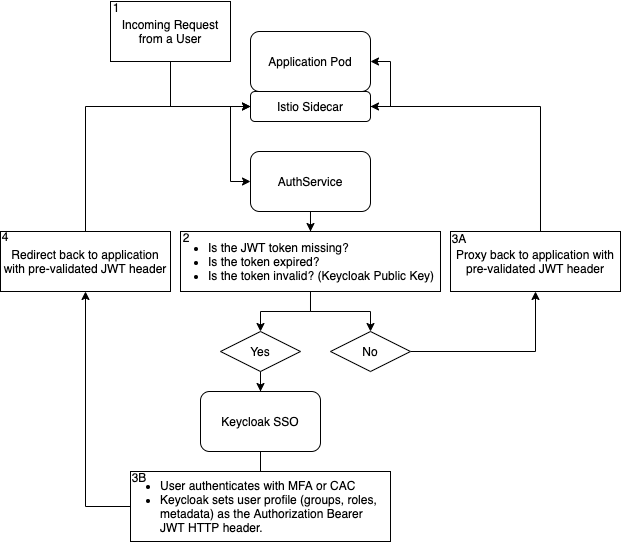
Here is a generalized workflow of how authentication and token validation are achieved.
What Does My Application's Keycloak Group Hierarchy Look Like?
Every application now uses a standardized group hierarchy in Keycloak.
How Do I Get Users Added to My Keycloak Groups and Create Custom Roles?
To add users to the above hierarchy or ask for a custom role to be added to an IL, submit a Keycloak Support Request through the P1 Help Desk . Submit one ticket with a complete list of users and the groups they should be added to. Do not submit separate tickets for individual users.
How Can My App Integrate?
By default, all mission workloads deployed to Party Bus will automatically be configured to authenticate against P1 SSO. What that means for you:
- It is safe to assume every request coming in is authenticated against P1 SSO.
- It is safe to assume the token has been pre-validated against the SSO public key.
- It is safe to assume the user making the requests is authenticated for the IL that your application is deployed to.
After the authservice has successfully validated a request, it will set the Authorization: Bearer header in the request that it passes into the application code. This header is in JWT format, can be parsed with any JWT library, and will contain the user's profile from Keycloak.
NOTE
If your application code uses the JWT http header instead of the Authorization header, please update it to use Authorization. The JWT header has been deprecated to save header size.
redirect-uri
Configure the following redirect URI in your Keycloak client settings for both staging and production environments (aka the DNS entry provided). It is required for authentication responses.
oauth/callback
Party Bus Test Drive: AuthService Emulation for Local Development
Party Bus Test Drive is an ecosystem of tools that help you quickly create a development environment that closely resembles the Party Bus platform. This helps your project get off the ground fast and simplifies migration into the Party Bus environment.
Party Bus Test Drive helps your application by setting up a single-point https-enabled ingress and injecting a JWT on every request to your microservices - all in your local development environment. This emulates the Party Bus AuthService process so you can write code in development that behaves the same in production and helps shorten the development feedback loops.
TIP
Party Bus Test Drive can help you create new projects that are optimized for Party Bus using many common front-end and back-end tech stacks and databases.
UG - AuthService/JWT - Django Implementation
You can use Django as the back-end for your REST API. It is essential to associate each user's request with their specific actions so that a mission commander can have a real-time overview of changes made to a mission. By implementing the authorization service, we can ensure that all users accessing the back-end are authenticated through the P1 SSO.
Decode the JWT for User Information
The approved way of receiving the user information is to decode the JWT that is passed through the Authorization header. For Django and Python we leverage the PyJWT library.
What if the Group Structure Doesn't Meet My Requirements?
The authentication JWT is included with every request and can be used for user authentication. If applications require role- or group-based authorization, this can be handled within the application.
Teams may store user roles and group assignments in their application database and use the user ID from the JWT to match and enforce access controls within their code.