


Commit Signing with GPG
Overview
Use this document to understand commit signing and how to set your operating system up to sign commits with a GPG. Developers who don't have a CAC can sign their commits using a GPG key. To learn how to sign commits using a CAC, follow the Commit Signing with CAC How-To Guide.
IMPORTANT
If your projects are in IL4 and IL5, you must sign commits with your CAC instead.
Store your GPG private key in a secure place. It should be treated like a password.
Party Bus does not support using IDE's for code signing. You are free to do so, but if you cannot sign commits in your IDE, please do not open a ticket with the Party Bus help desk. You will need to fix your issue or use the command line to sign commits that you create in your IDE.
Step-by-Step Guide
Mac Setup
Windows Setup
Common Errors
General Troubleshooting
While debugging, commits may be traced using GIT_TRACE=1.
INFO
EXAMPLE:GIT_TRACE=1 git commit -S -m "test commit"
Commit "Unverified" in GitLab
Make sure the user.email Git variable has been set. To set it, execute: git config --global user.email < GitLab email >.
Error: GPG failed to sign the data fatal: failed to write commit object
Refer to this Stack Overflow entry for additional error details and suggested solutions.
To resolve, complete the following:
- Execute
echo "test" | gpg --clear-sign. If the result is this:
Execute
export GPG_TTY=$(tty).Execute
echo "test" | gpg --clear-signagain. The result should be something like this: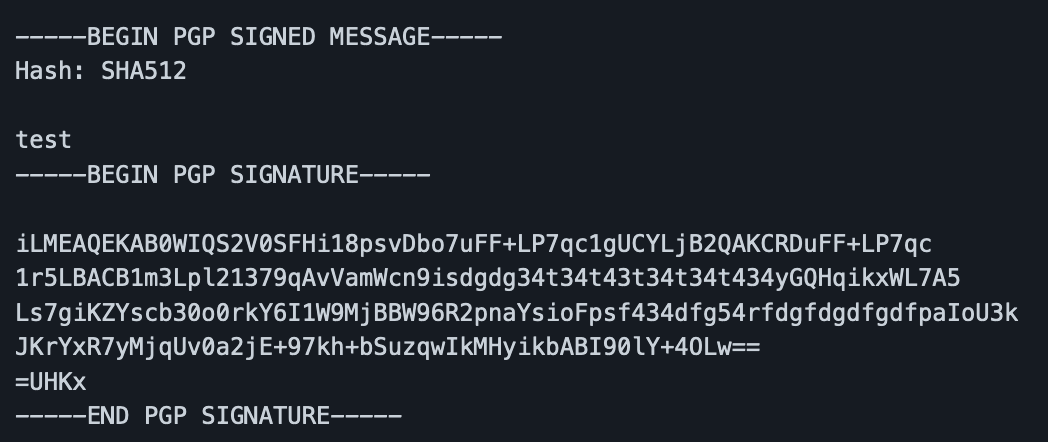
If the result is this:
bashgpg: signing failed: Timeout gpg: [stdin]: clear-sign failed: TimeoutRestart the
gpg-agentand then retry the command again.bashgpgconf --kill gpg-agent
Could Not Find Identity Matching Specified user-id
If you receive a message on commit similar to the below error, it could be caused by conflicting GPG format settings in the Git config.
could not find identity matching specified user-id: XXXXXXXXXX
error: gpg failed to sign the data
fatal: failed to write commit object- Check if the
gpg.formatis set by running this command:git config --get gpg.format. - Try unsetting it if it returns a value by running this command:
git config --unset gpg.format. Run the above command again to verify it is no longer set. - If it’s still set, manually remove it from
~/.gitconfigby deleting thegpg.formatand/or the format line under [gpg]. - Run
git config --get gpg.formatagain to ensure it was actually removed. - Retry your commit.