


Pull GitLab Image
Overview
This document describes how to authenticate with GitLab and pull a container image.
This guide applies to IL2, IL4, and IL5.
Steps
Navigate to your GitLab User Settings > Personal access tokens (IL2 | IL4 | IL5) and create an access token with at least read registry and read api permissions.
Open a terminal and run
docker login registry.il2.dso.mil.a. When prompted for your username, enter the one you see in the top right profile option with the @ symbol (e.g., schwartz_matthew2).
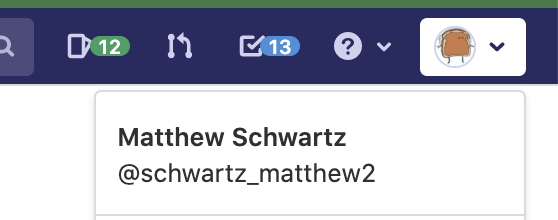
b. When prompted for your password, paste the access token you created in step 1.Pull the image. View an example below.
bash
docker pull registry.il2.dso.mil/platform-one/devops/pipeline-templates/base-image/harden-openjdk13-jre:1.13.0